
Stack Trace Assertions Using COFF
|
|
Dr. Carlo Pescio Stack Trace Assertions Using COFF |
Published in C/C++ Users Journal, June 1997.
Assertions are one of our most powerful tools for writing correct programs, and most likely, a large part of their power derives from their relative simplicity. So we should probably think twice before we go about "enhancing" assertions. Nevertheless, I've developed what I consider a worthwhile enhancement to the assertion support available in Win32. In this article I present an improved assertion in C++ that shows, among other things, the call stack — which is sometimes the only place that has the debugging information you need.
Motivation
Walking the Stack
When an assertion fails, some handling function is
called. Normally, this function displays a dialog box that lets you ignore the
failure, stop the program, or jump into the debugger. Showing the call stack
in the dialog box requires walking through the stack and retrieving some
information for each return address encountered. Unfortunately, walking the
stack in Win32 is not as easy as it was in Windows 3.x, where you could use
the ToolHelp functions StackTraceFirst/StackTraceNext; however, it is not an
insurmountable task.
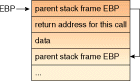
Figure 1 shows the structure of a typical call stack. The Extended Base Pointer (EBP)
register (an Intel CPU register) points to the top of the stack. The top
element contains the EBP for the previous stack frame. The element immediately
below the top element contains the return address for the current stack frame.
Therefore, given the initial value of EBP a program can walk the stack by
following the chain of top values.
The current value of EBP is easily accessed via inline assembly code, as in the pseudocode presented in Listing 1.
Listing 1

DWORD parentEBP ;
  __asm MOV parentEBP, EBP
do
  {
  BYTE* caller =
    *((BYTE**)parentEBP + 1) ;
  parentEBP =
    *(DWORD*)parentEBP ;
  dump info about caller
  }
while( ! end ) ;
Note that the pseudocode does not show how the loop is terminated. In theory,
the loop must break as soon as the caller points to somewhere into the Windows
innards, but let's neglect this detail for the moment. Consider instead the
"dump info about caller" statement: as stated earlier, I'll use the COFF
debugging information (if available) here to retrieve the function name, line
number, and so on. But to access COFF information, I must have a module name,
while all I've got is a pointer to some portion of code. This portion of the
code may belong to the running EXE or to any DLL.
Listing 2

DWORD parentEBP ;
  __asm MOV parentEBP, EBP
do
  {
  BYTE* caller =
    *((BYTE**)parentEBP + 1) ;
  parentEBP =
    *(DWORD*)parentEBP ;
  MEMORY_BASIC_INFORMATION mbi ;
  VirtualQuery( caller, &mbi, sizeof( mbi ) ) ;
  HINSTANCE hInstance = mbi.AllocationBase ;
  if( hInstance )
    DumpDebugInfo( caller, hInstance ) ;
  else
    break ; // End of the call chain
  }
while( TRUE ) ;
Retrieving Debugging
Information
The code in Listing 2 calls a yet-to-be-specified function DumpDebugInfo. This function takes two
parameters: the address for which we want debugging information to be dumped,
and the instance handle of the module that owns that code. Given the module
instance handle, the module filename is available through the API function
GetModuleFilename. If the module contains no debugging information, the
filename is all the information that can be displayed for each call in the
stack.
Armed with the module name and the address, the
programmer can manually retrieve the source file name and line number, using
for instance a MAP file; however, with debugging information available, it
becomes possible to dump more useful data. The kind of debugging information
that can be available varies widely: from the COFF format to CodeView, from
the BSC database to the Turbo Debugger format. Of these, I've selected COFF
since it is a relatively standardized format. Several Win32 compilers have an
option to include COFF debugging information in the PE files they generate.
COFF is also fairly stable and well documented, so you can parse COFF
debugging information without major effort. By contrast, formats such as
Microsoft's BSC are accessible only through libraries, which change between
one release of the compiler and another.
Going through all the details of the PE and COFF
formats (even under the debugging perspective) would take several pages, so
I'll concentrate on the main points here. If you want to know more about PE
and COFF, the best reference I've found is Pietrek's (see Bibliography), which
goes over the listing of the various fields, and explains some of the
rationale behind the format; also, studying the implementation of the PE_Debug
class (discussed below) should prove interesting.
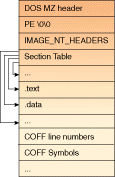
Figure 2 shows a simplified layout of a PE file. A PE file is divided into several
sections; some are at a fixed offset, others are pointed by values in a
Section Table. The values in the Section Table, as well as most other pointers
in the PE format, are actually Relative Virtual Addresses (RVA). RVA is a
complex name for a simple thing: the pointers are actually offsets from the
location where the PE file has been mapped in memory. Therefore, if the PE
file is mapped at address 0x400000 in memory, and the RVA for some field is
0x2800, the field's address in memory is 0x402800. This mechanism also works
backwards: you can obtain the RVA of the caller address by subtracting the
instance handle (converted to BYTE *) from the caller address itself.
(Remember that the instance handle is the starting linear address where the PE
file has been mapped.)
Listing 3 provides pseudocode for the lookup logic. First the module name is retrieved,
as explained above, and the file is mapped into memory; then the NT header of
the PE file is retrieved, as it contains important pointers to other sections.
The sections of interest for debugging purposes are the
IMAGE_COFF_SYMBOLS_HEADER structure (defined in WinNT.H), the Line Numbers
table, and the Symbol table. Obtaining each of these data structures involves
some gimmick with the pointers, and some knowledge of compiler-specific
quirks. (For instance, Borland decided to name the code sections "CODE"
instead of ".text".)
Listing 3


void DumpDebugInfo( const BYTE* caller,
                    HINSTANCE hInstance )
  {
  // retrieve filename
  const char* fname =
    GetModuleFilename( module ) ;

  // offset 0 is DOS header
  PIMAGE_DOS_HEADER fileBase =
    MapFileInMemory( fname ) ;

  // retrieve NT header
  PIMAGE_NT_HEADER NT_Header =
    fileBase + filebase->e_lfanew ;

  // Get debug header
  // Borland:
  PIMAGE_SECTION_HEADER debugHeader =
    SectionHeaderFromName( ".debug" ) ;
  PIMAGE_DEBUG_DIRECTORY debugDir =
    fileBase + debugHeader->PointerToRawData ;
  // Microsoft
  debugHeader = SectionHeaderFromName( ".rdata" ) ;
  debugDir = fileBase +
    debugHeader->PointerToRawData +
    debugDirRVA - debugHeader->VirtualAddress ;

  // Get COFF debug directory and COFF debug header
  Look for an entry in the debug directory table
  with Type == IMAGE_DEBUG_TYPE_COFF ;
  PIMAGE_COFF_SYMBOLS_HEADER COFFdebug  =
    fileBase + debugDir->PointerToRawData ;

  // Get symbol table, symbol count, string table;
  // the string table starts right after the symbol table
  PIMAGE_SYMBOL COFFsymbol =
    filebase + NT_Header->FileHeader.PointerToSymbolTable ;
  int COFFcount =
    NT_Header->FileHeader.NumberOfSymbols ;
  const char* stringTable =
    COFFsymbolTable + COFFsymbolCount ;

  // Dump info about caller
  int RVA = caller - (BYTE*)hInstance ;
  if( COFFcount && COFFsymbolTable )
    {
    // Lookup source file name
    Search in COFFsymbolTable a ".text"
    (or "CODE") section which includes RVA:
    that gives the filename ;

    // Lookup function name
    Search in COFFsymbolTable the function symbol
    with the biggest address <= RVA ;
    Lookup the function name in stringTable
    given the function symbol ;

    // Lookup line number
    PIMAGE_LINENUMBER lineTable =
      COFFDebugInfo +
      COFFDebugInfo->LvaToFirstLinenumber ;
    Search in lineTable the line number
    with the biggest address <= RVA ;

    Dump file/function/line info ;
    }
  else
    only module name and caller address available ;
  }
Once the important sections have been found, the lookup
code locates the symbol info and line number pertaining to the caller. To find
this information, the lookup routine searches for the highest entry in each
table with an RVA smaller than (or equal to) the RVA of the caller. For
example, if the caller is the 5th bytecode of the 6th line of function foo,
foo will be the function with the highest RVA smaller than the caller, and
line 6 of foo will be the line with the highest RVA smaller than the
caller.
The Verbose Assert DLL
The complete implementation is organized around three
classes (see Figure 3)
and a few extern functions grouped into the VerboseAssert utility class.
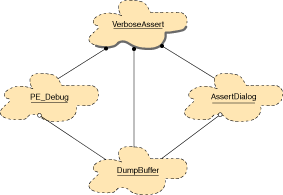
DumpBuffer implements a character buffer with a
printf-like method that appends text to the end. The buffer stores the text of
a message while the message itself is created.
AssertDialog is a dialog box with three buttons (see Figure 4) to
ignore, stop, or jump into the debugger. The dialog does not actually invoke
any action, but only stores the result of user interaction. This arrangement
completely decouples the user interface from the rest of the code. Since
AssertDialog is implemented directly at the SDK level, and does not involve a
framework such as MFC or OWL, you can use it without needing to include a
specific class library.

PE_Debug is responsible for parsing a PE file, and uses
a DumpBuffer to hold the result. The buffer itself is owned by VerboseAssert
(a function in the utility class VerboseAssert), which is called from the
VASSERT macro. Note that I've intentionally given a distinct name to the
macro, to avoid any clash with existing ones. If you rename VASSERT to ASSERT,
remember to #undefine any previous definition.
Since the code could conceivably execute in an
"inconsistent" state (otherwise, there would be no need for an assertion),
I've considered it an important design criterion to avoid any use of dynamic
memory. Thus, my approach is to jump through the COFF field for each address
on the stack. Although it could be more efficient to build a parse tree for
the debugging information once per module, I've preferred the slower approach
which is nonetheless safer in this context.
The only luxury I've afforded has been caching the
memory mapped file. Since in practice most addresses in the stack belong to
the same executable module, caching the memory mapped file avoids the overhead
of mapping the module in memory for each call. This technique suggests that I
can also avoid the replication of the module name for each call in the dump.
I've further extended the concept to the source file name, obtaining a
tree-like dump as shown in Figure 4.
Naturally, PE_Debug must be robust enough to survive
being applied to a corrupted PE file, so in the implementation I've caught any
exception generated from an incorrect field (which almost always causes a
wrong pointer to be dereferenced).
Finally, when the user clicks on "debug" the program
must invoke the debugger. There are basically two techniques available, namely
a call to DebugBreak or a single assembly instruction (INT 3). The former is
portable to non-Intel processors, but has the disadvantage of leaving the
debugger inside a Kernel function instead of inside the application. In the
current implementation, I've preferred the INT 3 approach.
To use the Verbose Assert DLL, you first turn on COFF
debugging information. In Visual C++, this is done under Project
Settings/Link/Debug. Then you link your project with verbassert.lib, and use
the VASSERT macro instead of the usual ASSERT inside your code. If you want
the enhanced support to be extended to existing libraries, they must be
recompiled, in which case you may want to rename VASSERT to ASSERT so as to
avoid tampering with the library source.
Dealing with Mangled Names
Most C++ compilers use a technique known as name
mangling to embed type information inside the names of functions written to an
object file. You may have seen the term "name decoration" in more recent
papers, apparently because some Internet search engines refuse to index
articles containing certain words. As shown in Figure 4,
the COFF tables stores functions by their mangled (pardon, decorated) name.
Although the original function name is often a part of the decorated name, it
would be a significant improvement if the debugging tool showed a more
readable function prototype instead of the decorated name. Unfortunately,
there is no standardization on the decoration algorithm, and in most cases the
algorithm itself is not documented and not guaranteed to be preserved between
different releases of the same compiler. However, in some cases, the vendor
makes a library available to perform conversions from the decorated name to
the function prototype. For instance, Microsoft provides the Microsoft Browser
Toolkit DLL free of charge (available on their Internet site), and I've been
told that a similar library exists for the Borland products, although I wasn't
able to obtain it.
The Microsoft library is named BSCKITxx, where xx
stands for the version number of the Visual C++ compiler you want to use. For
example, version 4.0 requires BSCKIT40.
Listing 4 shows how to implement a demangle function in C++ using the Browser Toolkit.
Listing 4 #include "hungary.h" #include "bscapi.h" #includeAfter inclusion of the kit's header files, the function is trivial to write. Obviously, you must link with the library .LIB file, and turn on the generation of browsing information (Project Settings/Browse Info). However, I've found it inconvenient to have to download a new version of the kit and create a different version of the verbose assert DLL for every updated version of Visual C++. So I do not include a call to demangle in the verbose assert code. After all, the decorated name is quite readable and the line number is always there to help. If you want to print demangled names, just add a call to demangle at the end of PE_Debug::DumpSymbolInfo, where the function name is finally printed.#include const char* demangle( const char* module, const char* function ) { Bsc *bsc ; if( Bsc :: open( module, &bsc ) ) return( bsc->formatDname( function ) ) ; else return( function ) ; }
Conclusions
The code presented here is a complete replacement for
the assert macro that comes with your compiler, but requires a Win32 system
running on the Intel platform. The stack walking code is Intel-specific.
However, it should be possible to port that short piece of code to other
platforms without too much effort. Since the COFF format is used outside the
Win32 world as well (for instance in many UNIX-based compilers), some of the
code presented here can be ported to other operating systems as well.
Naturally, if the target system does not support memory mapped files, some
significant changes to the actual code will be necessary, although most of the
logic may remain the same. If you port the code to any platform, operating
system, or compiler, I'd be glad to hear from you.
Bibliography
Readers interested in the theory and practice of using
assertions will find an excellent introduction in McConnel or Maguire below,
while Meyer and Rosenblum both present a more comprehensive view of the topic.
Cline and Lea introduce a C++ extension that enters into the
programming-by-contract realm.
Steve McConnel. Code Complete (Microsoft Press, 1993).
Steve Maguire. Writing Solid Code (Microsoft Press,
1993).
Bertrand Meyer. "Applying Design by Contract," IEEE
Computer, October 1992.
David S. Rosenblum. "A Practical Approach to
Programming With Assertions," IEEE Transactions on Software Engineering,
January 1995.
Marshall P. Cline and Doug Lea. "The Behaviour of C++
Classes," Proceedings of the Symposium on Object Oriented Programming
Emphasizing Practical Applications (Marist College, 1990).
Matt Pietrek. Windows 95 System Programming Secrets.
(IDG Books, 1995).
Biography
Carlo Pescio has a doctoral degree in Computer Science and is a consultant and mentor for various European companies and corporations, including the Directorate of the European Commission. He specializes in object oriented technologies and is a member of IEEE Computer Society, the ACM, and the New York Academy of Sciences. He lives in Savona, Italy and can be contacted at pescio@eptacom.net.